
The B2B email map: who sends what, to whom, and under which rules
The tools are good at sending. What's missing is memory across them: who this person is, which account they belong to, what they've already received, and whether they said stop.

In a B2B company, email is five systems run by five teams, and almost none of them talk to each other.
Marketing sends the newsletter from HubSpot. Sales runs sequences from Outreach or Instantly. Product sends onboarding nudges from Customer.io and password resets from Postmark. Support replies from Zendesk. Security posts incident notices from Statuspage. All of it lands in the same inbox, often for the same person at the same account, in the same week.
This guide maps that ground for anyone who has to make sense of it: a new marketing ops hire, a founder setting up the stack, a RevOps lead cleaning up after a merger. It covers who sends what, which tools sit in each category, how the person and the account fit together, and the rules that decide whether any of it should be sent at all.
Key takeaways
- B2B email is sent by five teams (marketing, sales, product, support, security) through a dozen or more tools, often to the same person in the same week.
- CAN-SPAM has no B2B exception. Commercial email needs a postal address and a working opt-out, honored within 10 business days.
- Gmail, Yahoo and Microsoft require SPF, DKIM, DMARC, one-click unsubscribe and a spam rate under 0.3% from anyone sending 5,000+ messages a day.
- Most failures happen because each tool keeps its own opt-out and do-not-contact list.
- The fix is one identity for each person and account, and one contact policy that every tool, rep and AI agent checks before sending.
A practical example: one buyer, five teams, one decision layer
Take a VP of Marketing at a mid-size software company. Call her Dana. In one week:
- She downloads a report, so marketing's nurture flow adds her.
- She starts a free trial, so product's onboarding journey begins.
- Her company matches an outbound list, so a cold sequence is queued for her.
- Her account executive sees the trial and wants to email her from Gmail.
- On Thursday, an outage hits and the status page emails every admin.
Without a shared layer, Dana gets mail from four tools, and the cold sequence pitches a product she's already using.
With a central decision layer, every send checks one record of Dana and her account first:
- The cold sequence is blocked, because she's an active trial user.
- Nurture pauses while onboarding runs, so she gets one track instead of two.
- The AE sees a note before writing: active trial, two emails this week, open opportunity. The email still goes, just better informed.
- The outage notice goes out untouched. It has to.
- Her reply, and the meeting she books, are tied back to the onboarding email that prompted them.
Same tools, same teams. Fewer emails, and each one makes sense to the person reading it. The rest of this guide explains how each part works.
The map: five senders, one inbox
Five teams send email in a B2B company. They write to two kinds of recipient that are tied together: a person, and the account that person works for.
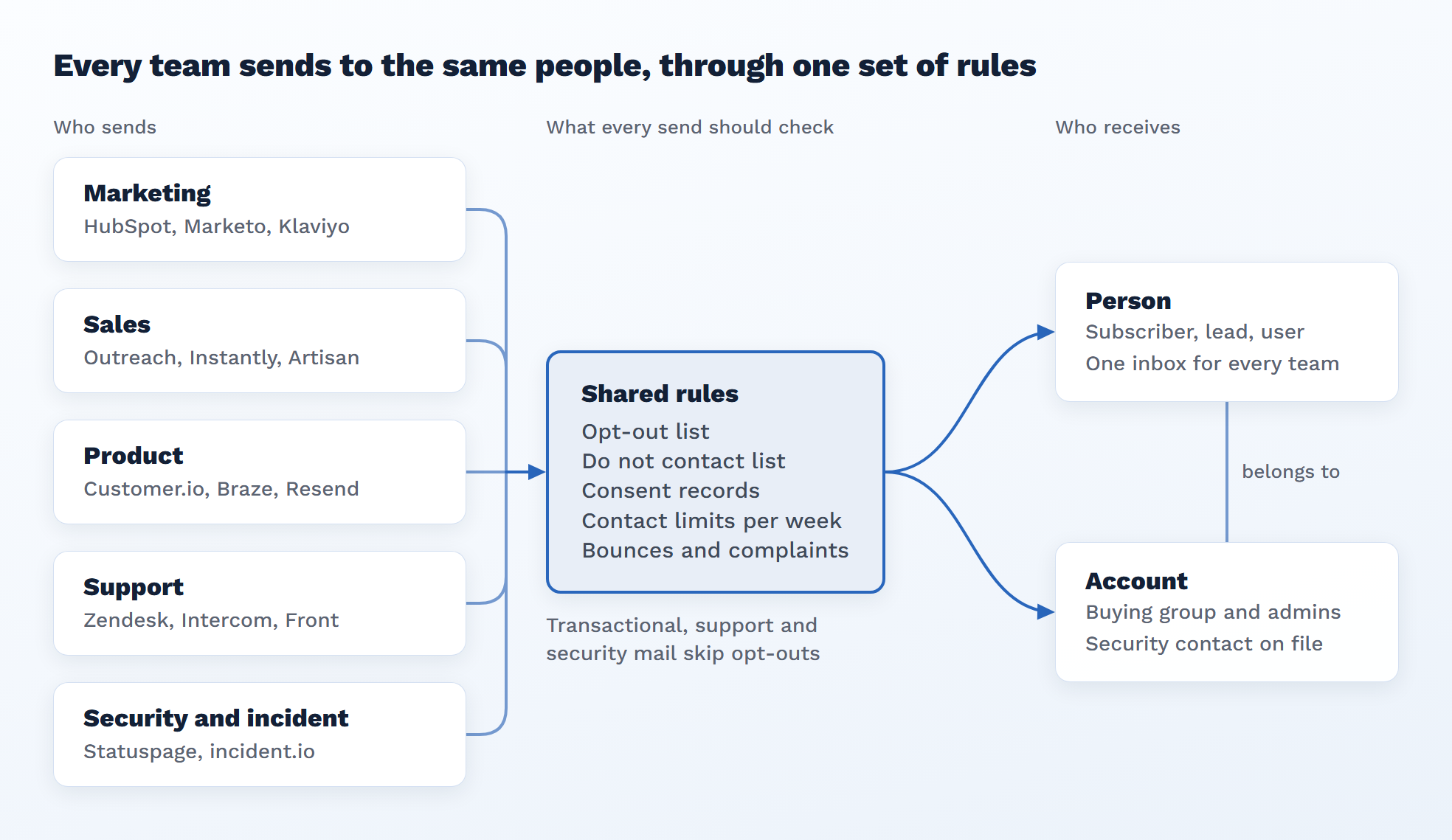
Read it left to right. Each team uses its own tools, but all of them reach the same person, who belongs to an account. In a well-run stack every commercial send checks one shared set of records first. Support and security mail is the exception: it has to arrive even for people who opted out of everything else.
Marketing email: one-to-many, permission first
Marketing email goes to people who opted in, or at least didn't opt out, and it's sent in batches. It is commercial email under every law that applies, so it always needs an unsubscribe link and a sender address.
| Email type | What it does | Example tools |
|---|---|---|
| Newsletter and content | Keeps subscribers warm with posts, reports, product news | HubSpot, Beehiiv, Substack, Mailchimp |
| Nurture | Moves a lead from first touch toward a sales conversation | HubSpot, Marketo, Pardot (Salesforce Marketing Cloud Account Engagement), ActiveCampaign |
| Events and webinars | Invites, reminders, replays | ON24, Goldcast, Zoom Events, plus the marketing platform |
| ABM and account plays | Emails timed to an account's buying stage, often next to ads | Demandbase, 6sense, HubSpot ABM |
| D2C and promotional | Offers, launches, cart and browse flows | Klaviyo, Braze, Attentive |
Two things trip people up here. Marketing platforms usually think in contacts, so an account-level story ("this buying group at Acme is warming up") has to be pieced together from separate records. And the subscriber list is often the only consent record the company has, which makes it the list every other team should be checking.
Sales email: one-to-one, often cold
Sales email looks personal and is sent from a rep's name, but most of it runs on sequences: a set of steps over days or weeks that stops when the person replies. Much of it goes to people who never asked for it. That is legal in the US under CAN-SPAM as long as the rules are followed, and much tighter in Canada and the EU.
| Category | What it's for | Example tools |
|---|---|---|
| Sales engagement platforms | Rep-run sequences with email, calls and LinkedIn steps, tied to the CRM | Outreach, Salesloft (now merged with Clari), HubSpot Sales Hub, Apollo |
| Cold email at volume | Many sending mailboxes, warm-up, inbox rotation | Instantly, Smartlead, lemlist |
| AI SDRs | An agent finds leads, writes, follows up and books meetings | Artisan, 11x, AiSDR, Regie.ai (which mixes agents with human reps) |
| AI GTM builders | Workflows that research, enrich and route, with email as one output | Swan, Clay |
The split that matters: sales engagement tools assume a rep is in charge, and cold email tools assume volume. AI SDRs try to do both. Whichever you run, cold outreach is usually sent from separate secondary domains so a bad week doesn't damage the main company domain that product and support depend on.
Product email: triggered by what the user does
Product email fires off events inside the app: someone signs up, invites a teammate, hits a usage limit, goes quiet for two weeks. It splits into two kinds that look alike and are treated very differently.
- Transactional: password resets, receipts, login codes, invite links. The user needs these to use the product, so they go out even to people who unsubscribed from marketing.
- Lifecycle: onboarding tips, feature nudges, upgrade prompts, win-back. These are commercial, so they follow the same consent and unsubscribe rules as marketing.
| Category | What it's for | Example tools |
|---|---|---|
| Email APIs | Transactional sends from code, high deliverability | Resend, Postmark, SendGrid, Amazon SES, Mailgun |
| Lifecycle and journeys | Event-driven onboarding and engagement flows | Customer.io, Braze, Iterable, Loops, Intercom |
| Product analytics feeding triggers | The events and cohorts that start the flows | PostHog, Amplitude, Mixpanel, Segment |
In product-led companies, these emails decide whether a free user becomes a product-qualified lead. That is also where the handoff to sales tends to go wrong: the user gets an onboarding email and a cold sequence on the same day, from two tools that don't know about each other.
Support, incident and security email: must arrive, every time
These emails carry no pitch. They answer a ticket, warn about an outage, or tell a customer their data was involved in a breach. People who opted out of everything else still get them, and some are required by contract or law.
| Email type | Typical sender | Example tools |
|---|---|---|
| Ticket replies and help center follow-ups | Support team | Zendesk, Intercom, Freshdesk, HubSpot Service Hub, Front |
| Status and incident updates | Engineering, SRE | Atlassian Statuspage, incident.io, Instatus, PagerDuty status pages |
| Security notices and breach notification | Security, legal | Sent from the main domain through the email API; drafted with legal |
| Account and admin alerts | Product | Email API (new login, role change, billing failure) |
| Trust and compliance updates | Security, GRC | Trust centers such as Vanta and Drata |
One practical rule: send these from the main company domain and keep its reputation clean. If cold outbound runs on that same domain and gets flagged, the outage notice lands in spam too. Incident and breach lists also need the account view, because the person who must be told is the admin or security contact on the contract, not whoever signed up first.
The funnel view: which email shows up where
Read down the table and the handoffs appear. Each stage changes who owns the email, which tool sends it, and which rule matters most.
| Funnel stage | Email types | Owner | Tool category | Rule to watch |
|---|---|---|---|---|
| Awareness | Cold outbound, newsletter signup confirmation | Sales, marketing | Cold email tools, AI SDRs, marketing platform | Consent by country; secondary sending domains |
| Interest and nurture | Content nurture, event invites, ABM touches | Marketing | Marketing automation, event platforms | Preference center; one-click unsubscribe |
| Evaluation | Rep sequences, demo follow-ups, trial welcome | Sales, product | Sales engagement, lifecycle tools | No double-touch between sales and product |
| Purchase | Contracts, invoices, receipts, account setup | Sales, finance, product | CRM, billing, email API | Transactional only: no promotions inside |
| Onboarding and adoption | Getting started, feature nudges, usage alerts | Product, customer success | Lifecycle tools, email API | Lifecycle is commercial; transactional is not |
| Expansion and renewal | Upsell, renewal reminders, QBR invites | Customer success, sales | CRM, sales engagement, lifecycle tools | DNC for accounts in active negotiation |
| Any time | Ticket replies, outage and incident notices, security and breach notices | Support, engineering, security | Help desk, status page, email API | Must reach the right admin on the account, even after unsubscribe |
The rules layer: who you're allowed to email
Every email above passes through the same three gates: the law, the mailbox provider, and your own records of who said no. Most compliance failures happen because each tool keeps its own copy of the third gate.
1. The law. In the US, CAN-SPAM makes no exception for business-to-business email. Commercial email needs an accurate sender, an honest subject line, a physical postal address and a clear opt-out. Opt-outs must be honored within 10 business days, and each violating email can cost up to $53,088. Both the company being promoted and the company sending can be held responsible, so outsourcing to an agency or an AI SDR doesn't move the liability. Canada (CASL) requires consent before most commercial email, and the EU and UK (GDPR and the ePrivacy rules) vary by country on whether cold B2B email to a named person is allowed at all. Check those with counsel before you send there.
2. The mailbox providers. Google's email sender guidelines treat anyone sending more than 5,000 messages a day to personal Gmail accounts as a bulk sender. Bulk senders need SPF, DKIM and DMARC, one-click unsubscribe on marketing mail, and a spam rate kept under 0.3% (Google asks for under 0.10%). Yahoo enforces matching rules, and Microsoft brought Outlook.com, Hotmail and Live in line in May 2025 (summary). Google also asks senders not to mix promotions into receipts and to use a separate From address for each type of mail.
3. Your own lists. This is the gate a company controls, and it's usually split across tools:
| Record | What it holds | Where it usually lives |
|---|---|---|
| Subscription and preference center | Which topics a person signed up for, and at what frequency | Marketing platform |
| Unsubscribes | People who opted out of marketing email | Each sending tool, separately |
| Do not contact (DNC) | People or whole accounts that must never be contacted: customers in a renewal, legal holds, competitors, people who asked by phone | CRM fields, spreadsheets, sales ops memory |
| Bounces and complaints | Bad addresses and spam reports | Each sending tool, separately |
| Consent records | When and how someone opted in, for proof | Forms, CRM, consent tools such as OneTrust |
The rule of thumb that keeps companies out of trouble: one opt-out list and one DNC list that every sending tool checks before it sends, with transactional, support and security mail as the only exceptions.
Where it breaks: nobody holds the whole picture
Each tool knows its own sends and nothing else. That gap shows up in four predictable ways.
- The same person, three tools, one week. A VP downloads a report, gets a nurture email from HubSpot, a cold sequence from Instantly and an onboarding nudge from Customer.io. Each tool followed its own rules. Together they look careless.
- An unsubscribe that only stopped one tool. She opts out of the newsletter. The sales sequence keeps going because Outreach never heard about it. Under CAN-SPAM that opt-out covers all marketing email from the company.
- Person versus account. Marketing and sales tools think in contacts. Buying decisions happen at the account, with five to ten people involved. Nobody sees that three people at Acme got mail this week and one of them is in an open deal.
- Results that each tool grades itself. Every tool reports its own opens, clicks and replies. None of them can say which email moved a deal forward, because none of them sees the others or the CRM outcome.
All four come from the same gap: nothing sits above the senders with one view of each person and account, one set of contact rules, and the outcomes from every tool.
Ways to close the gap
There are five common fixes. Most companies end up combining two of them: one for the rules and one for the shared view.
| Approach | Example tools | What it fixes | What it leaves open | Best fit |
|---|---|---|---|---|
| Make the CRM the hub | HubSpot, Salesforce | Opt-outs and DNC synced into one record that each tool reads | Sync lag, so a tool can send before it hears; weak account view; no weekly contact limit | Small teams with two or three senders |
| Use fewer senders | HubSpot Marketing, Sales and Service Hubs on one database | Overlap and split unsubscribes, since one system sends everything | Gives up specialist tools for cold volume, product events and incidents | Early-stage companies before the stack grows |
| Central consent and preference management | OneTrust, Ketch, Transcend | One consent record and preference center pushed to every tool; proof for regulators | Doesn't decide who to email or how often; no account view | Companies selling into the EU, UK or Canada |
| Warehouse as the source of truth | Snowflake, BigQuery or Databricks, with Hightouch or Census pushing lists out | One person and account model, one suppression list, outcomes joined in one place | Needs a data team; lists refresh on a schedule, not at send time | Mid-market and enterprise teams with a data team |
| A decision layer above the senders | iCustomer, or a team-built service on the warehouse | Decides who gets which email and when, holds contact limits across tools, feeds replies and meetings back | Still depends on clean identity and on each tool sharing its results | Teams running several senders who want one set of rules and proof of what worked |
How iCustomer approaches it
This is the gap we built iCustomer's Growth Brain for. It sits above the tools you already use and doesn't replace them. Instantly, Smartlead, ActiveCampaign and Klaviyo keep doing the sending. Growth Brain decides who should get which email and when, based on fit, intent and what the person or account has already received. Each recipient gets tracked links, so clicks, replies and meetings are tied back to the decision that caused them.
No tool can control every email a company sends, and none should try. So the contact policy works at three levels:
- Block the automated sends Growth Brain enrols: opt-outs, do-not-contact and weekly limits are checked first, and one person can't be enrolled in two plays at once.
- Push suppression lists into tools that fire their own emails, like a lifecycle journey, so those tools filter on the same rules.
- Count and warn on 1:1 email a rep sends from Gmail or Outlook, when it's logged, without ever blocking the rep.
Outage, security and transactional mail stays outside the policy. It has to arrive.
It covers the rules and the proof. It doesn't write your emails or warm up your domains. Those stay with the tools built for them.
Whichever you pick, give one person ownership of the contact policy: the opt-out list, the DNC list, the weekly limit, and which domain each team sends from. Without an owner, every new tool brings its own copy of the rules.
The test of all this is how it feels to the person on the other end. From the buyer's side, a well-run brand sends fewer emails, stops everywhere after one unsubscribe, never pitches a product they already use, and always tells them when something breaks. Each email shows up because something they did made it relevant. That's why they keep opening the next one.
A checklist for a well-run email stack
- Every sending tool listed, with an owner and the domain it sends from
- Cold outbound on secondary domains; product, support and security on the main domain
- SPF, DKIM and DMARC set up on every sending domain, with Postmaster Tools watching the spam rate
- One-click unsubscribe on all marketing and lifecycle mail
- One opt-out list and one DNC list, synced to every tool before each send
- Transactional, support and security mail kept free of promotions
- A weekly limit on how many emails one person can get across all tools
- Account-level view of who at each company is being emailed, by whom
- Incident and breach contacts kept per account, checked every quarter
- Replies, meetings and opt-outs from every tool fed back into the CRM
- Consent records you could show a regulator, for every contact in Canada, the EU and the UK
The short version
B2B email is a newsletter, a sequence, a password reset and an outage notice, sent by five teams through a dozen tools to the same people. The tools are good at sending. What's missing is memory across them: who this person is, which account they belong to, what they've already received, and whether they said stop.
Getting that layer right starts with identity. Today the same buyer is an email address in Instantly, a contact ID in HubSpot, a user ID in the product, a ticket requester in Zendesk and a name in a rep's Gmail. A universal identity system ties all of those to one person, and ties that person to their account. Every opt-out, send and reply then lands on the same record, whichever tool it came from.
This gets more urgent as agents start sending. An AI SDR, a lifecycle agent, or an assistant calling tools over MCP (the Model Context Protocol, which lets AI agents use outside tools) acts in seconds and doesn't check with marketing ops first. When every person and every agent looks up the same identity and the same rules before acting, the buyer hears from one company with one memory. When each keeps its own copy, more agents just means more ways to email the wrong person.
Each team keeps the tools it likes. What they share is the identity and the rules.
Frequently asked questions
What is a contact policy in B2B email?
A contact policy is the set of rules every email has to pass before it goes out: who opted out, who is on the do-not-contact list, what consent you hold, and how many emails one person can get in a week. It works best when every tool, rep and agent checks the same copy.
Does CAN-SPAM apply to B2B email?
Yes. The FTC says the law makes no exception for business-to-business email. Commercial email needs accurate headers, a physical postal address and a working opt-out honored within 10 business days. Penalties reach $53,088 per violating email.
What are Gmail's bulk sender requirements?
Anyone sending more than 5,000 messages a day to personal Gmail accounts needs SPF, DKIM and DMARC, one-click unsubscribe on marketing mail, and a spam rate under 0.3%. Yahoo enforces matching rules, and Microsoft added similar ones for Outlook.com in May 2025.
Do transactional and security emails need an unsubscribe link?
Not when their primary purpose is transactional: a receipt, a password reset, a security or outage notice. They're exempt from most CAN-SPAM rules and from Gmail's one-click unsubscribe requirement. Adding promotions to them can make them commercial email.
What's the difference between an unsubscribe and a do-not-contact list?
An unsubscribe is a person opting out of marketing email. A do-not-contact list is the company's own decision not to contact a person or account at all, for reasons like an active negotiation, a legal hold or a competitor. Every sending tool should check both.
What is a decision layer for email?
A decision layer sits above the sending tools. It decides who should get which email and when, holds one contact policy across tools, and feeds replies and meetings back so teams can see what worked. The tools still do the sending.
How do AI agents and MCP change email compliance?
AI SDRs and assistants that call tools over MCP send email in seconds, with no human review. The law still applies to every message. Agents need to check the same identity, opt-out and do-not-contact records people do, or they repeat mistakes at machine speed.
Sources
- CAN-SPAM Act: A Compliance Guide for Business, Federal Trade Commission
- Email sender guidelines, Gmail Help
- Google, Yahoo and Microsoft sender requirements, Warmy
Decisions that compound, in your inbox the first Friday of every month.
No spam. Unsubscribe anytime.
Get the next issue
Decision intelligence for marketers. One issue, the first Friday of every month.